

If you’re a designer, illustrator, or creative running your own business, you’re probably already juggling enough.
Client work.
Admin.
Social media.
Marketing.
Trying to keep your portfolio updated.
So when you spend time promoting your work, you want it to keep doing something after you hit publish.
That’s one of the biggest reasons I keep coming back to Pinterest.
Unlike most social platforms, Pinterest behaves much more like a visual search engine. People go there actively looking for ideas, references, products, services and inspiration, which makes it particularly useful for visual creatives.
A pin doesn’t necessarily disappear after a day or two either. Good content can continue surfacing in search and driving traffic long after you originally posted it.
For me, that’s been the real appeal.
Why Pinterest works so well for creatives
Pinterest is built around discovery.
People search for things like:
branding inspiration
illustration styles
packaging design
colour palettes
editorial illustration
logo ideas
portfolio inspiration
creative business advice
Which means your work isn’t only being shown to people who already follow you.
It can also appear in front of someone who is actively searching for exactly the kind of thing you create.
That distinction matters.
On many platforms, visibility depends heavily on timing, engagement and your existing audience. Pinterest gives your content another chance to be found through search.
And for creatives, where the work itself is highly visual, that makes it a particularly natural fit.
Is Pinterest actually worth the effort?
For me, yes.
When I started using Pinterest more strategically, it became one of the strongest sources of referral traffic to my website. It has also led directly to enquiries, clients, and product sales.
What I like most is that the results can compound. A social post might have a short window of attention. A Pinterest pin can continue sending people to your website months, and even years later if it keeps being surfaced in search.
That doesn’t mean every pin performs. It means the content you create has the potential to keep working for longer.
And when you’re already creating work, writing blog posts or building products, being able to repurpose that existing content into something with a longer lifespan is incredibly useful.
How I use Pinterest strategically
1. Create more than one pin from the same piece of content
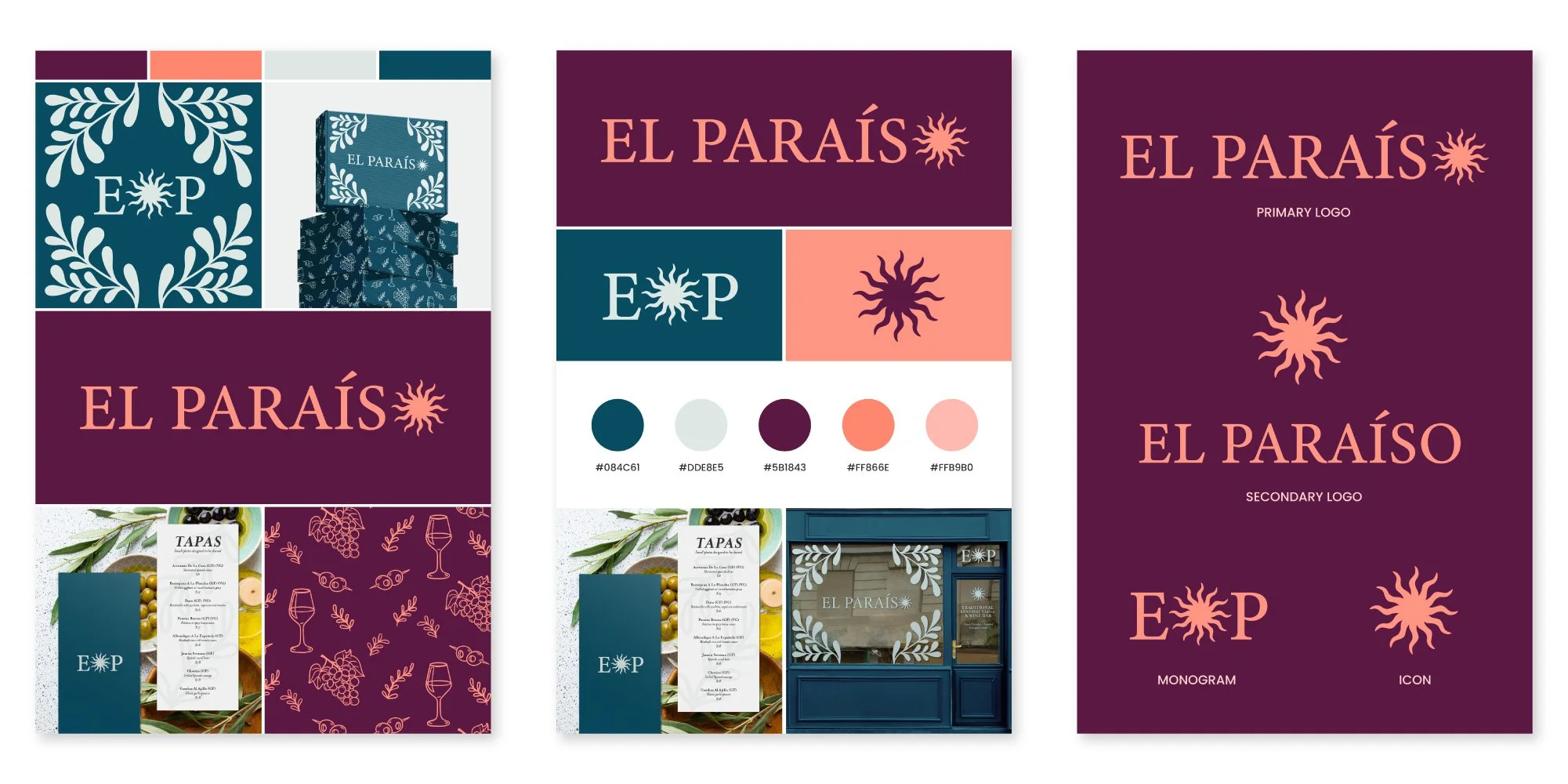
You don’t need a completely new idea every time you post. One project can become multiple pins.
If you’ve created a brand identity, for example, you might create separate pins showing:
the logo suite
packaging applications
colour palette
typography
mockups
individual illustrations or assets
the full case study
Each pin gives someone a different entry point into the same project. The same applies to blog posts, products and resources.
I’d much rather create several useful pins from one strong piece of content than constantly feel pressured to invent something new.
2. Treat Pinterest like search
This is probably the biggest shift to make. Pinterest isn’t just about posting something beautiful. You also need to help the platform understand what the image is about.
That means using relevant language in places like:
pin titles
descriptions
text overlays
board names
profile information
Be specific. Instead of naming a pin something vague like: Strawberry pattern
you might use: Vintage Strawberry Pattern for Packaging, Apparel and Product Design
That gives Pinterest, and the person searching, much more context.
The same principle applies to descriptions. Write naturally, but include the words someone might genuinely search when looking for work like yours.
3. Create several pins for every blog post
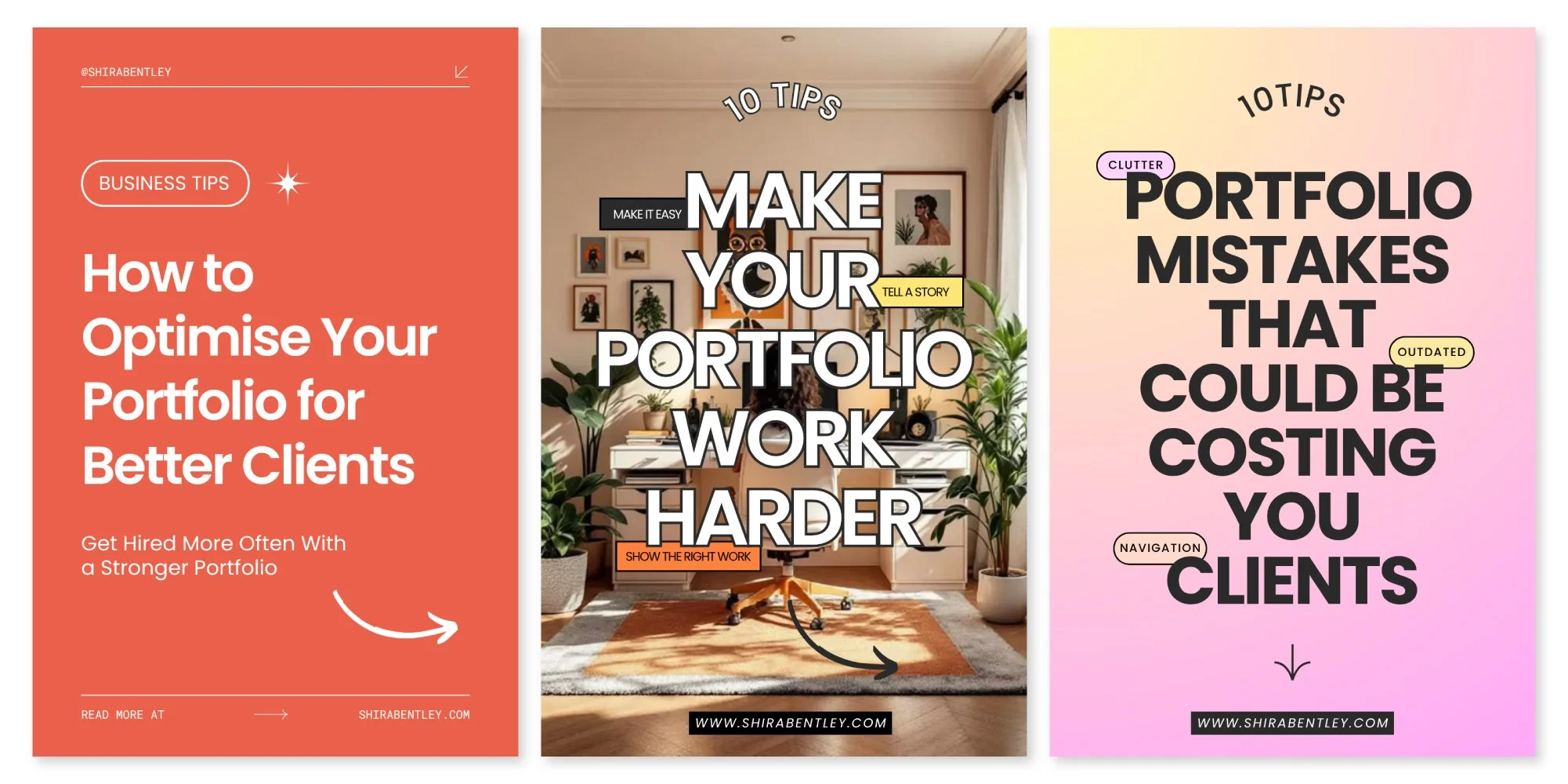
Pinterest has been particularly useful for extending the life of my blog content. For each article, I usually create several different pin designs.
That might include:
a text-led cover
a visual version using an image from the article
a second layout with a different headline
a pin highlighting one specific tip from the post
Different designs can appeal to different people, even when they all lead to the same article. Some of my strongest-performing pins have also been very simple, sometimes just text.
You don’t necessarily need a highly designed image every time. The idea matters too.
4. Be consistent enough to learn what works
I used to think Pinterest success meant posting constantly, but I don’t think that’s the most useful way to think about it anymore. What matters more is building enough consistency that you can see patterns.
Which topics get saves?
Which pin styles generate clicks?
Which projects attract potential clients?
Which blog posts keep resurfacing?
A sustainable posting rhythm will usually beat an ambitious schedule you abandon after two weeks.
Use Pinterest’s scheduling tools to batch your content where possible, then pay attention to what actually performs.
5. Send people somewhere useful
Every pin should lead somewhere relevant.
If you’re sharing a project, link to the project.
If you’re sharing a blog post, link to the article.
If you’re promoting a resource, link to the resource.
It sounds obvious, but the destination matters just as much as the pin itself. You’re not trying to collect impressions for the sake of it. You’re trying to help someone move from:
That looks interesting
to:
I want to see more of this person’s work.
6. Claim your website
If you have your own website, claim it through Pinterest. This helps connect content saved from your site back to your Pinterest account and gives you better visibility into how your website content is being shared.
It’s particularly useful if people are already pinning your work independently.
Before I started using Pinterest strategically, I was already getting referral traffic from other people saving work from my website. Claiming the site helped connect those pins back to me more clearly.
Pinterest works best when you think long term
Pinterest probably isn’t the platform to choose if you’re looking for instant attention. That’s not really why I use it.
I use it because it gives the work I’m already creating more opportunities to be found.
A project can become several pins.
A blog post can keep attracting readers months later.
An old piece of work can suddenly start bringing people to your portfolio again.
And because people are actively searching rather than simply scrolling through a feed, there’s a better chance that the person finding your work is already interested in the subject.
For a visual creative, that’s incredibly valuable. You don’t need every pin to take off.
You just need enough of the right ones to keep putting your work in front of the right people.
More practical help for your creative business
Explore guides, templates, tools and free resources for designers and illustrators who want more clarity around clients, pricing, portfolios and running their business.
Stay in the loop
Subscribe to my newsletter for thoughtful insights, practical advice, and useful resources for building a sustainable creative business.